The Best Budget Graphics Card: Radeon RX 9060 XT 16GB
Picked, used, and installed by the techs at York Computer Repair in York & Shiloh, PA.
Last reviewed: October 2026
As an Amazon Associate, York Computer Repair earns from qualifying purchases at no extra cost to you.
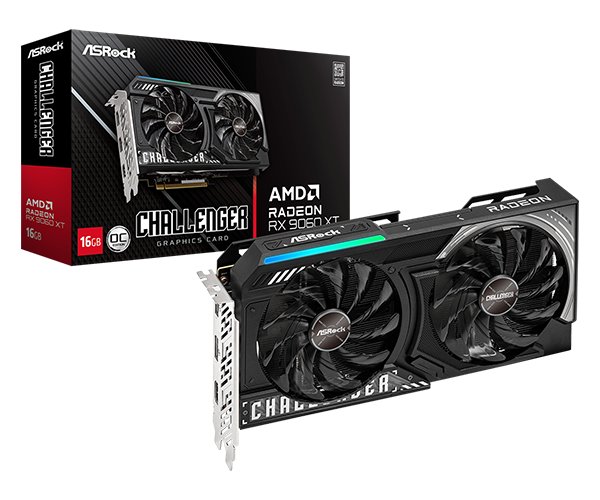
| Memory | 16GB GDDR6 |
|---|---|
| Memory bus | 128-bit |
| Architecture | RDNA 4 |
| Interface | PCIe 5.0 |
| Target resolution | 1080p, lighter 1440p |
| Upscaling | FSR 4 |
| Power supply | 650W recommended |
| Launch price | $349 |
| Typical price now | ~$520 |
✓ Pros
- 16GB of memory at a budget price, where rivals ship 8GB
- Typically around ten percent faster than an RTX 5060 at 1080p
- 650W power supply is plenty — no supply upgrade needed
- Ray tracing and FSR both much improved this generation
⚠ Watch-outs
- About $170 above its launch price
- 128-bit memory bus limits it at higher resolutions
- NVIDIA still ahead in ray-traced titles and some creative software
- The 8GB version of this same card is a trap — avoid it
Our take (and why the 8GB version is a trap)
The single most important thing on this page: buy the 16GB version. There is an 8GB RX 9060 XT and an 8GB RTX 5060, and they are frequently only a little cheaper. Do not buy them. When a graphics card runs out of memory you do not get a gracefully lower frame rate — you get sudden stutter, textures loading in late, and occasional freezes. It is the worst-feeling kind of slow, and it is already happening in current games at settings a budget card should manage. Sixteen gigabytes is what makes this card still fine in three years.
Why AMD here rather than NVIDIA. At this price point the RX 9060 XT is typically around ten percent faster than the RTX 5060 at 1080p, and carries twice the memory. AMD ray tracing has improved substantially with this generation, and FSR 4 has closed much of the upscaling gap with DLSS. NVIDIA still has an edge in ray-traced titles and in some creative software, but at the budget end those are not usually what people are buying for.
Match the card to the monitor. This is the mistake we see most. If you have a 1080p 60Hz screen, this card is already more than you need and the money would do more good as memory or an SSD. If you have a 1080p high-refresh monitor or a 1440p screen and modest expectations, this is the right card. If you have a 1440p high-refresh screen and want settings turned up, you want our 1440p pick instead.
On the price, the same warning as everywhere else. This launched at $349 and sells for around $520. Graphics cards, memory and storage are all inflated for the same reason — gamers competing with datacentre buyers for manufacturing capacity. If your current card still runs what you play, keeping it is a legitimate decision this year and we will tell you so rather than sell you something.
Good news on the practical side: this is a modest card physically and electrically. A quality 650W supply is plenty, it fits ordinary cases without drama, and it will not need a power supply upgrade alongside it. That matters when the whole point is keeping the build affordable.
Mistakes we see people make
- Buying the 8GB version to save a little and living with stutter instead.
- Pairing a 1440p-capable card with a 1080p 60Hz monitor.
- Assuming AMD is still bad at ray tracing — this generation changed that.
- Replacing a working card in the worst pricing year in recent memory.
- Spending the savings on memory this year instead of on the card or an SSD.
Specs in plain English
- 16GB of memory — the specification that decides how long a budget card stays usable. Do not buy the 8GB version.
- RDNA 4 — much better ray tracing than AMD’s previous generations.
- FSR 4 upscaling — substantially closer to DLSS than earlier versions.
- Around ten percent faster than an RTX 5060 at 1080p in independent testing.
- 650W power supply is plenty — no supply upgrade needed for most builds.
- 128-bit memory bus — narrower than the higher tiers, which is where the price saving lives.
- Launched at $349, sells for about $520 — the 2026 market again.
How it compares
| Card | Memory | Best for | Approx. price |
|---|---|---|---|
| Radeon RX 9060 XT 16GB (our pick) | 16GB | 1080p and lighter 1440p | ~$520 |
| GeForce RTX 5060 | 8GB | Only if you need DLSS or CUDA specifically | ~$350–$450 |
| Radeon RX 9060 XT 8GB | 8GB | Avoid — same card, half the lifespan | less |
| GeForce RTX 5070 Ti | 16GB | 1440p high refresh with settings up | ~$1,250 |
Why it's a smart buy (and who agrees with us)
Tom’s Hardware’s RX 9060 XT 16GB review gave it their Editor’s Choice award, describing it as easy to live with for a wide range of gamers across a wide range of titles.
PC Gamer’s review makes the same case against the RTX 5060 Ti, and GamersNexus’s review covers the same ground with their usual scepticism intact. The 16GB configuration is the one all of them single out — which is exactly the point we make hardest above.
How we’d build around it
This card suits a sensible, affordable build. Here is the rest of one.
RX 9060 XT 16GB + a Ryzen 5 7600X + a B650 motherboard + 16 to 32GB of DDR5-6000 CL30 + a 1TB Gen4 NVMe SSD + a 650W 80+ Gold power supply.
- Processor: Ryzen 5 7600X — well matched to this card at 1080p. our pick → · see options on Amazon →
- Motherboard: A B650 (AM5) board — room to upgrade the chip later. our pick → · see options on Amazon →
- Cooler: Thermalright Peerless Assassin 120 SE — about $35 and genuinely enough. our pick → · see options on Amazon →
- Power supply: 650W 80+ Gold — no supply upgrade needed for this card. our pick → · see options on Amazon →
- Storage: 1TB Gen4 NVMe SSD — the upgrade you feel every single day. our pick → · see options on Amazon →
Want a full, guaranteed-compatible parts list for your exact budget? Talk to our York, PA techs — or drop the parts off and we’ll assemble and test the whole machine.
Live price and stock are on Amazon — always check the current price before ordering.
Check Price on Amazon →As an Amazon Associate, York Computer Repair earns from qualifying purchases. This costs you nothing extra.
Don't want to build it yourself? We'll build it for you.
The commonest way to waste money on a budget build is buying a card that does not match the monitor. Tell our free tool what screen you have and it will size the card properly, or bring the machine in and we will fit it, update the drivers and confirm it performs as it should before it goes home.
See our custom PC build service →Prefer to talk to a human? Call us at 717-739-9675 (Mon–Fri, 9–5).
Frequently asked questions
Should I get the 8GB version to save money?
No. This is the strongest advice on the page. When a graphics card runs out of memory it does not simply run a bit slower — it stutters, textures load in late, and the game occasionally freezes. That is already happening to 8GB cards in current titles at reasonable settings. The 16GB version is often only modestly more expensive and it is the difference between a card that lasts three years and one that frustrates you next year.
Is AMD or NVIDIA better at this price?
At this tier we lean AMD. The RX 9060 XT is typically around ten percent quicker than an RTX 5060 at 1080p and carries twice the memory. NVIDIA keeps an advantage in ray-traced games and in some creative applications, so if you use those specifically, weigh that. For straightforward 1080p gaming on a budget, the AMD card gives you more.
Will this run 1440p?
Yes, with sensible expectations. At 1440p you will be turning some settings down in demanding titles and leaning on FSR upscaling, which is fine and looks good now. If you have a 1440p high-refresh monitor and want to run things near maximum, you want the tier above — see our 1440p pick. Match the card to the screen you actually own.
Do I need a new power supply for it?
Almost certainly not. A quality 650W unit handles this card comfortably, and many existing builds already have that. This is one of the nice things about buying at this tier — the card does not trigger a chain of other upgrades. If your supply is very old or a no-name unit, replace it regardless, because that is the part that can take the rest of the machine with it.
More parts we trust: see all of our recommended PC parts, or step up to our 1440p graphics card pick if your monitor calls for it.