The Best AM5 Motherboard for Most People: MSI MAG B650 Tomahawk WiFi
Picked, used, and installed by the techs at York Computer Repair in York & Shiloh, PA.
Last reviewed: October 2026
As an Amazon Associate, York Computer Repair earns from qualifying purchases at no extra cost to you.
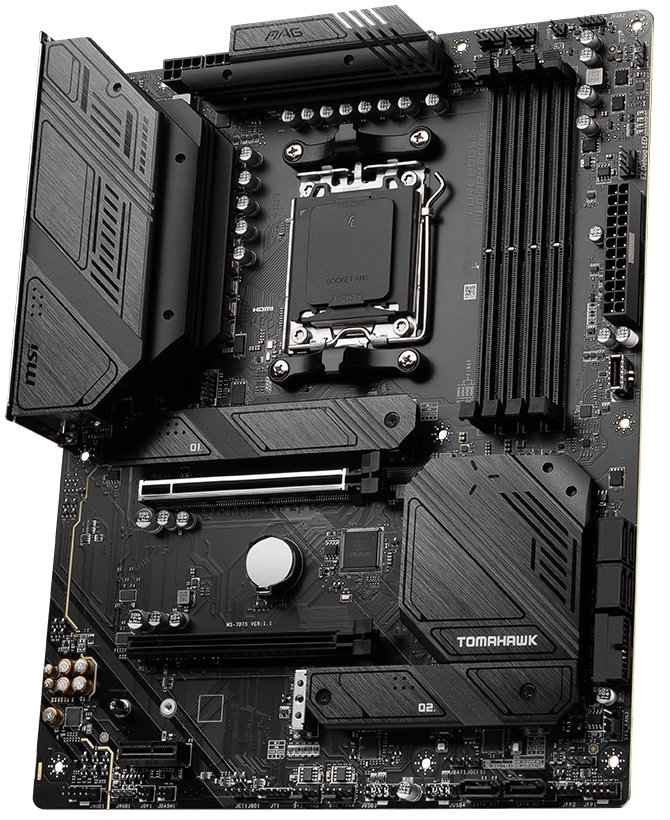
| Socket | AM5 (Ryzen 7000 / 8000 / 9000) |
|---|---|
| Chipset | AMD B650 |
| Form factor | ATX |
| Memory | 4x DDR5 slots |
| M.2 slots | 3 (one PCIe 4.0 x4 with heatsink) |
| Graphics slot | PCIe 4.0 x16 |
| Networking | Wi-Fi 6E + 2.5Gb ethernet |
| BIOS Flashback | Yes — update with no CPU fitted |
| Rear USB | Includes USB 3.2 Gen 2x2 20Gbps Type-C |
| Typical price | ~$176 |
✓ Pros
- Power delivery far beyond what any gaming CPU needs
- BIOS Flashback — a new CPU can never brick the board
- Wi-Fi 6E and 2.5Gb ethernet built in
- Three M.2 slots for later expansion
⚠ Watch-outs
- PCIe 4.0 to the graphics card, not 5.0
- Full ATX — will not fit small cases
- No fancy screen or lighting, if that matters to you
- Still needs a firmware update for the newest chips
Our take (from the bench, not a spec sheet)
Motherboards are the part people overspend on hardest. A $400 board and a $175 board run the same games at the same frame rate. What you are actually buying with a motherboard is reliability, connectivity, and not getting stuck — and the Tomahawk covers all three for the price of the cheap seats.
What it does well: the power delivery is genuinely overbuilt for this class. We have run 16-core chips on this board with the heatsinks barely warm. For a Ryzen 7 9800X3D or a Ryzen 5 7600X it is not remotely stressed. Three M.2 slots means you can add drives later without pulling anything out.
The feature we care about most is the boring one. BIOS Flashback lets you flash new firmware with no CPU and no memory installed — just the board, the power supply, and a USB stick. This is the difference between a five-minute fix and a dead build. Every AM5 board needs a firmware update to recognise a newer Ryzen chip, and boards without Flashback leave you needing an older CPU you do not own just to boot far enough to update. We have had customers bring in exactly that dead end. On this board it cannot happen.
Who should NOT buy it: if you want PCIe 5.0 to the graphics card, you want a B650E or X670E instead. Honestly, though, no card sold today is bottlenecked by PCIe 4.0 — this is a spec people pay for and never use. And if you are building a small-form-factor PC, this is a full ATX board and will not fit; you want micro-ATX or mini-ITX.
What we tell every customer: put the money you saved here into the graphics card or the SSD. Those change how the machine feels. The motherboard just has to not be the problem.
How we set it up in the shop
Order the parts and drop them off (or have us order everything) — here is exactly what we do when we build with the B650 Tomahawk WiFi:
- Update the BIOS first, before installing anything else — use Flashback with just the power supply connected if the board is older stock.
- Seat the CPU gently. On AM5 the delicate pins are in the socket on the board, not on the chip, so a dropped CPU is survivable and a bent socket usually is not.
- Leave EXPO off unless it was asked for. If we do enable it, the machine gets a long memory test under sustained load before it ships.
- Use the M.2 slot nearest the CPU for your boot drive — it is the one with the heatsink and the direct CPU lanes.
- Stand the board off properly in the case. A missing or extra standoff shorting the back of the board is a fault we still see regularly.
Mistakes we see people make
- Buying a board without BIOS Flashback to save $20, then finding it will not boot with a new chip.
- Paying for B650E or X670E for PCIe 5.0 that nothing you own can use.
- Switching EXPO on without testing it, then chasing random crashes for weeks.
- Ordering ATX for a case that only takes micro-ATX — measure before you buy.
- Spending motherboard money that should have gone into the graphics card.
Specs in plain English
- AM5 socket — takes Ryzen 7000, 8000 and 9000 chips, and AMD has committed to the socket into 2027 and beyond.
- Overbuilt power delivery — more than a gaming CPU can use, which is why it runs cool and stays stable.
- BIOS Flashback — update the firmware with no CPU installed. This is the feature that saves builds.
- Three M.2 slots — room for the drive you buy now and the two you will add later.
- Wi-Fi 6E and 2.5Gb ethernet — both built in, no add-in cards.
- PCIe 4.0 graphics slot — not 5.0, and in real games that difference is currently nothing.
- Full ATX — make sure your case takes an ATX board before you order.
How it compares
| Board | Chipset | Best for | Approx. price |
|---|---|---|---|
| MSI MAG B650 Tomahawk WiFi (our pick) | B650 | Almost every AM5 gaming build | ~$176 |
| Gigabyte B650 Aorus Elite AX | B650 | Same class, if the Tomahawk is out of stock | ~$150–$180 |
| ASRock B650 Steel Legend WiFi | B650 | Adds a PCIe 5.0 M.2 slot | ~$170–$200 |
| Any B650E / X670E board | B650E / X670E | Only if you truly need PCIe 5.0 graphics | ~$230+ |
Why it's a smart buy (and who agrees with us)
We are not alone on this one. Tom’s Hardware’s best-motherboards roundup keeps the Tomahawk line among its AM5 picks, and PC Gamer’s best gaming motherboards guide lands in the same place for mid-range AM5 builds.
The pattern across the independent reviews is consistent: B650 boards in this bracket give up PCIe 5.0 to the graphics slot and essentially nothing else a gaming build touches. That is the trade, and for almost every customer who walks through our door it is the right one.
How we’d build around it
The Tomahawk is the easy part. Here is what we put around it for a build that will not fight you later.
MSI MAG B650 Tomahawk WiFi + a Ryzen 7 9800X3D or Ryzen 5 7600X + 32GB DDR5-6000 CL30 + a 1TB Gen4 NVMe SSD + a good cooler + an 80+ Gold power supply.
- Processor: Ryzen 7 9800X3D for gaming — the chip this board is built to feed. our pick → · see options on Amazon →
- Budget processor: Ryzen 5 7600X — same socket, far less money. our pick → · see options on Amazon →
- Memory: 32GB DDR5-6000 CL30 — the right kit — and see why we leave EXPO off. our pick → · see options on Amazon →
- Storage: 1TB Gen4 NVMe SSD — goes in the slot nearest the CPU. our pick → · see options on Amazon →
- Cooler: A 280mm AIO or a good air cooler — AM5 chips reward staying cool. our pick → · see options on Amazon →
- Power supply: 750W 80+ Gold — headroom for whatever card comes next. our pick → · see options on Amazon →
Want a full, guaranteed-compatible parts list for your exact budget? Talk to our York, PA techs — or drop the parts off and we’ll assemble and test the whole machine.
Live price and stock are on Amazon — always check the current price before ordering.
Check Price on Amazon →As an Amazon Associate, York Computer Repair earns from qualifying purchases. This costs you nothing extra.
Don't want to build it yourself? We'll build it for you.
Matching a board to your CPU, memory and case is where most first-time builds go wrong — wrong socket, wrong size, wrong memory speed. We do this every week in York, PA. Tell our free tool what you want and it will put a compatible parts list together around this board, then we will assemble it, update the firmware, and stress-test it before it leaves the bench.
See our custom PC build service →Prefer to talk to a human? Call us at 717-739-9675 (Mon–Fri, 9–5).
Frequently asked questions
Does the B650 Tomahawk support Ryzen 9000 chips?
Yes, with a firmware update. Most boards sold today already ship with a recent BIOS, but if yours does not, this board has BIOS Flashback — you can update it with no CPU installed at all, using just a USB stick and the power supply. That is the single best reason to buy this board over a cheaper one. We update the BIOS on every build before we do anything else.
Do I need B650E or X670E instead?
Almost certainly not. The E versions add PCIe 5.0 to the graphics card slot. No graphics card sold today is meaningfully held back by PCIe 4.0, so you would be paying now for a benefit that has not arrived. If you are doing heavy multi-GPU or professional storage work, come talk to us — otherwise B650 is the sensible buy.
Should I buy a B850 board instead?
Only if the price is close. B850 is AMD's newer mainstream chipset: it makes PCIe 5.0 mandatory on the main M.2 slot and the boards usually come with newer Wi-Fi. For gaming, neither of those changes how the machine feels, because a Gen5 drive loads games barely faster than a Gen4 one. Our rule: if the B850 version of a board you like is within about ten percent of the B650 price, take the B850. If the B650 is clearly cheaper, it is the better buy.
What memory should I put in it?
Buy DDR5-6000 with CL30 timings. That is the sweet spot for Ryzen because the memory runs in step with the chip. One thing we do differently to most guides: we do not routinely switch the EXPO profile on. EXPO is a one-click overclock, and across our bench we have traced enough intermittent crashes back to it that we leave it off unless a customer asks and we can test it properly. Be warned that DDR5 pricing is ugly right now; our memory page explains what it actually costs in 2026.
Is the Wi-Fi any good, or should I run a cable?
The Wi-Fi 6E is genuinely fine and we have no complaints about it. That said, if your router is more than a room away and you game online, run an ethernet cable. Wired is always more consistent, and this board has 2.5Gb ethernet built in so it will not be the limit.
More parts we trust: see all of our recommended PC parts, or read up on the best AMD gaming CPU and the memory to pair with it.