The Best DDR5 RAM for Gaming — and an Honest Warning About the Price
Picked, used, and installed by the techs at York Computer Repair in York & Shiloh, PA.
Last reviewed: October 2026
As an Amazon Associate, York Computer Repair earns from qualifying purchases at no extra cost to you.
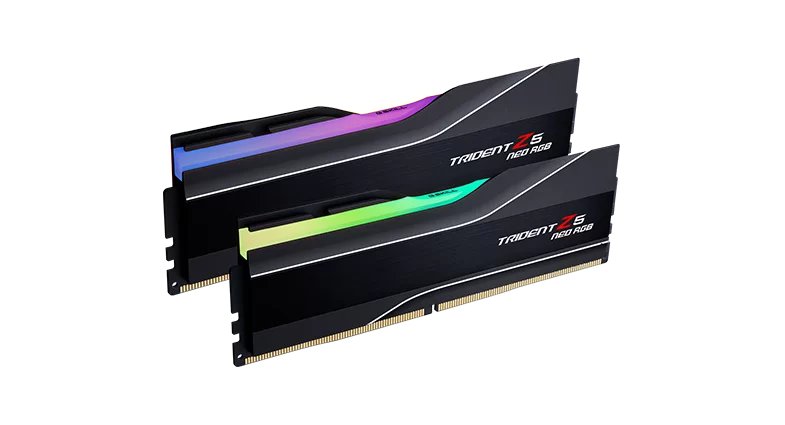
| Capacity | 32GB (2x16GB) |
|---|---|
| Speed | DDR5-6000 |
| Timings | CL30-38-38-96 |
| Voltage | 1.35V |
| Profile | AMD EXPO on the kit — we usually leave it off |
| Best for | AM5 Ryzen 7000 / 8000 / 9000 |
| Heat spreaders | Yes, with RGB light bar |
| Typical price | ~$600 (was ~$100 in 2024) |
✓ Pros
- Exactly the right speed and timings for a Ryzen build
- Runs happily at stock speeds, so you are not forced to overclock it to get a working PC
- Two sticks, leaving two slots free for later
- G.SKILL kits from this line have been reliable on every AM5 board we have used
⚠ Watch-outs
- Roughly six times what this kit cost in 2024
- 32GB is comfort rather than necessity for pure gaming
- RGB you may not want, and cannot pay to remove
- Tall heat spreaders can foul very large air coolers
Our take (and the part nobody wants to hear)
Which kit to buy is easy and has not changed. AMD Ryzen chips run their internal fabric in step with the memory at DDR5-6000, so 6000 is the speed you want. Faster kits fall out of step and can actually be slower in games. CL30 is the tight timing that gets the most out of that speed. DDR5-6000 CL30 is the kit. That part is settled.
Whether to switch EXPO on is where we part company with most guides. EXPO is AMD’s one-click profile that runs the memory at the speed printed on the box. Almost every buying guide tells you to enable it and treats forgetting as a rookie error. Our experience on the bench has been different: EXPO is an overclock, the profile is validated by the memory maker rather than against your specific board and chip, and we have traced enough intermittent faults back to it — random reboots, a blue screen weeks after a build, a machine that passes a short memory test and fails a long one — that we now leave it off unless a customer specifically wants it.
What that costs you, honestly: with EXPO off the kit runs at a slower baseline speed, and in real games you are usually giving up a few percent. We think that is a good trade for a machine that never randomly restarts, and we would rather tell you our actual position than repeat the standard advice. If you do want EXPO on we will enable it — and then run a long memory test under sustained load before the machine leaves, because a short test will happily pass a configuration that fails an hour into a game.
The price is the problem. We are not going to pretend otherwise. This exact class of kit sold for around $100 in 2024. As of October 2026 it is roughly $600, and the trackers we watch show no sign of it easing yet. Memory manufacturers have shifted capacity toward datacentre and AI customers, and consumer DDR5 supply has not kept up. This is not a sale we are talking you into — it is a market we are warning you about.
What we actually tell customers right now:
If you already have DDR5, keep it. This is the worst possible time to upgrade memory for the sake of it. If you have a working 16GB or 32GB kit, it is fine. Games are not memory-starved at 32GB, and most are still perfectly happy at 16GB.
If you are building now and money is tight, buy 16GB and add later. A single 2x8GB kit costs a fraction of this. Yes, mixing kits later is slightly less ideal than buying matched from the start, and yes, you may need to run at a slightly lower speed. That is a much smaller problem than paying $600 today. Our advice for a budget build with a Ryzen 5 7600X is to put the difference into the graphics card, which you will actually feel.
If you can wait, wait. Nobody can promise when this eases. But if your current machine works and you were upgrading for fun, this is a bad year to do it and a fine year to sit tight.
Who should still buy 32GB today: anyone doing video editing, 3D work, heavy multitasking, or running virtual machines. Those workloads genuinely use the memory, and time lost to swapping costs more than the kit. For pure gaming, 32GB is comfort, not necessity.
Mistakes we see people make
- Buying 32GB on reflex in a year when memory costs six times what it used to.
- Enabling EXPO because a guide said to, then spending weeks chasing crashes that only show up under load.
- Chasing DDR5-7200 for Ryzen and ending up slower than a 6000 CL30 kit.
- Filling all four slots with two kits bought months apart and then wondering why it will not run at rated speed.
- Upgrading working memory this year just because an upgrade felt due.
Specs in plain English
- DDR5-6000 — the speed AMD Ryzen chips are tuned around. Faster is not better here.
- CL30 timings — tighter than the common CL36 kits, and worth having at the same speed.
- AMD EXPO profile — present on the kit, but it is an overclock. We leave it off by default; see our take above for why.
- 32GB in two sticks — leaves your other two slots free, which is the right way to buy.
- 1.35V — standard for this class, no exotic cooling needed.
- Roughly $600 in October 2026 — about six times what this kit cost in 2024. Not a typo.
How it compares
| Kit | Capacity | Best for | Approx. price |
|---|---|---|---|
| G.SKILL Trident Z5 Neo RGB DDR5-6000 CL30 (our pick) | 32GB | Ryzen gaming and creator builds | ~$600 |
| A 16GB (2x8GB) DDR5-6000 CL30 kit | 16GB | Gaming on a real budget in this market | far less |
| Patriot Viper Venom DDR5-6000 CL30 | 32GB | Same spec, often a little cheaper | ~$465 |
| Crucial Pro DDR5-6000 CL36 | 32GB | Looser timings, sometimes better value | ~$510 |
Why it's a smart buy (and who agrees with us)
On which kit to buy, this is settled. Newegg’s 2026 DDR5 guide lands on DDR5-6000 CL30 for Ryzen builds, for the same reason we do: AMD’s Infinity Fabric runs one-to-one with memory at 6000, and pushing past it gives back more than it gains. That guide also tells you to switch EXPO on, which is where we differ — that is our own bench experience talking, not a disagreement about the hardware.
The same guide is candid about the market, and so are we — their write-up on why DDR5 prices are up tracks what we are seeing on our own parts orders. We would rather tell you that plainly than quietly sell you a kit at six times its old price and let you find out later.
How we’d build around it
Memory does not work alone. Here is the rest of the build we would put around it — and where we would move the money in a year like this one.
32GB DDR5-6000 CL30 (or 16GB if the budget is tight) + a Ryzen 7 9800X3D or Ryzen 5 7600X + a B650 motherboard + a 1TB Gen4 NVMe SSD + a good cooler.
- Motherboard: A B650 (AM5) board — where the memory settings live, EXPO included. our pick → · see options on Amazon →
- Processor: Ryzen 7 9800X3D — the chip that most rewards fast memory. our pick → · see options on Amazon →
- Budget processor: Ryzen 5 7600X — where we would send the memory savings. our pick → · see options on Amazon →
- Storage: 1TB Gen4 NVMe SSD — also caught up in the 2026 price spike. our pick → · see options on Amazon →
- Graphics card: Whatever your budget allows — in this market, frames per dollar live here, not in the memory. our pick → · see options on Amazon →
Want a full, guaranteed-compatible parts list for your exact budget? Talk to our York, PA techs — or drop the parts off and we’ll assemble and test the whole machine.
Live price and stock are on Amazon — always check the current price before ordering.
Check Price on Amazon →As an Amazon Associate, York Computer Repair earns from qualifying purchases. This costs you nothing extra.
Don't want to build it yourself? We'll build it for you.
Memory is the part where the spec sheet and the price tag are telling two different stories right now. If you are not sure whether to buy 16GB, 32GB, or wait entirely, talk to us before you spend — we price real builds in York, PA every week and we will tell you honestly which way we would go with your budget.
See our custom PC build service →Prefer to talk to a human? Call us at 717-739-9675 (Mon–Fri, 9–5).
Frequently asked questions
Why is DDR5 so expensive in 2026?
Memory manufacturers have shifted a large share of production toward datacentre and AI customers, and consumer DDR5 supply has not kept pace. The result is that a 32GB DDR5-6000 kit that cost around $100 in 2024 is roughly $600 as we write this in October 2026. It is not a single retailer gouging — it is across the market. We are telling you because you deserve to know before you budget a build, not after.
Should I buy 16GB now and 32GB later?
In this market, often yes. If you are gaming and money is tight, a 16GB kit costs a fraction of a 32GB one and games run fine on 16GB today. Adding a second kit later is slightly less ideal than buying matched sticks up front — you may end up running a notch slower — but that is a far smaller penalty than paying six times the historic price right now. If you edit video or run virtual machines, buy the 32GB.
Is DDR5-6400 or DDR5-7200 better for Ryzen?
Usually no. AMD Ryzen chips run their internal fabric in step with memory at DDR5-6000. Push past that and the fabric drops out of sync, which can make a faster kit slower in real games. Buy 6000 CL30, and buy the timing rather than the headline number — a bigger number on the box mostly buys a more aggressive overclock profile, which is exactly the thing we are cautious about.
Should I turn EXPO on?
Most guides say yes automatically. We do not, and it is worth explaining why. EXPO is a one-click overclock: it runs the memory faster than the baseline the chip guarantees, using a profile the memory maker validated on their hardware rather than against your board and your chip. On our bench that has been behind a real share of the intermittent faults we end up chasing — random restarts, a blue screen weeks after a build, a machine that passes a five-minute memory test and fails a two-hour one. So we leave it off by default. You give up a few percent in games and you get a machine that does not surprise you. If you want it on, we will do it, and then test it properly under sustained load first.
More parts we trust: see all of our recommended PC parts, or read the motherboard guide and our SSD pick, which is caught in the same price squeeze.